Building Rating Widget using Static Variable
Data for the Rating widget can come from a Variable - Static, Live etc.. In this example, we will see how to use a Static Variable as the data source for a Rating Widget. The process is same for all types of Variables.
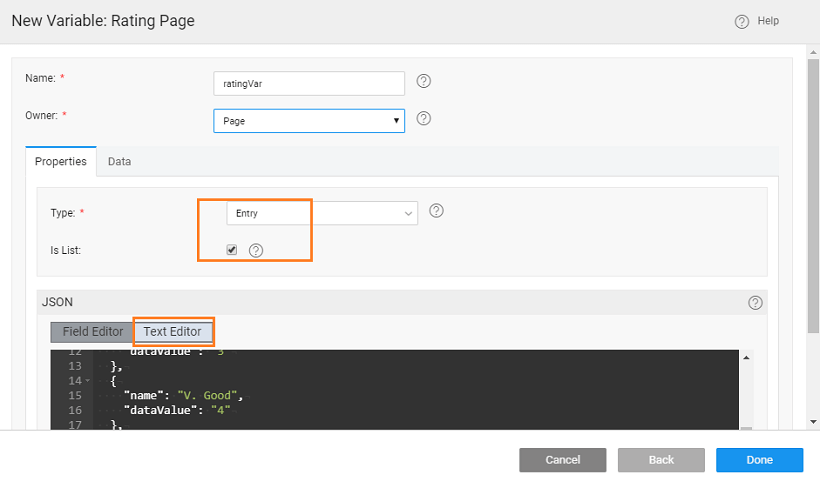
- Create a Static Variable of Entry Type, with Is List option selected and using the following JSON structure:
[
  {
    "name": "Poor",
    "dataValue": "1"
  },
  {
    "name": "Average",
    "dataValue": "2"
  },
  {
    "name": "Good",
    "dataValue": "3"
  },
  {
    "name": "V. Good",
    "dataValue": "4"
  },
  {
    "name": "Excellent",
    "dataValue": "5"
  }
]
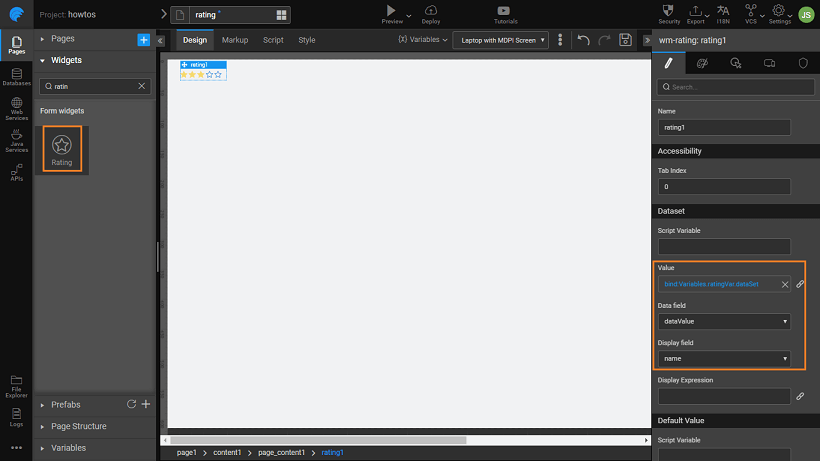
- Drag and drop a Rating widget
- Bind the Value Dataset property to the Static Variable created above and set the Data and Display Fields to the respective fields within the Variable.
- Set the properties for Default Value, Maximum Value and Show captions according to your app requirements.
- Run the app.
See Also
Rating Widget Use Cases
How to build Rating widget from static data
How to build an interactive rating widget